QCAT API v2
Welcome to the documentation of version 2 of the QCAT API.
Additional information on the API can be found on the interactive documentation page allowing to try out available requests.
The example requests below are either for the command line tool curl or for the GUI application Postman.
Available Configurations
Return the available Configurations in QCAT.
Endpoint: /api/v2/configuration/
Allowed method: GET
- Request headers:
Authorization: Your authorization token for the QCAT API. Specified in the formatToken AUTH_TOKENAccept: Optionally specify the format of the response. Available formats are JSON (application/json), XML (application/xml) and CSV (text/csv). Default:application/json
Optional Get parameters: flat: If present, the structure will be a flat list
of questions.
Example request with curl
Request:
curl -X GET -H 'Authorization: Token 0e03f8061c83e58d1595c3b21ddce9712233cb4e' -H 'Accept: application/json' https://qcat.wocat.net/en/api/v2/configuration/
Response:
{
    "configurations": [
        [
            "approaches"
        ],
        [
            "cca"
        ],
        [
            "technologies"
        ],
        [
            "unccd"
        ],
        [
            "watershed"
        ],
        [
            "wocat"
        ]
    ]
}
Hint
If the response of your request is in binary format (e.g. weird characters shown on the screen), add the parameter -\-compressed to the curl command.
Available Editions for a Configuration
Return the available Editions for a Configuration in QCAT.
Endpoint: /api/v2/configuration/{code}/
Allowed method: GET
- Request headers:
Authorization: Your authorization token for the QCAT API. Specified in the formatToken AUTH_TOKENAccept: Optionally specify the format of the response. Available formats are JSON (application/json), XML (application/xml) and CSV (text/csv). Default:application/json
Optional Get parameters: flat: If present, the structure will be a flat list
of questions.
Example request with curl
Request:
curl -X GET -H 'Authorization: Token 0e03f8061c83e58d1595c3b21ddce9712233cb4e' -H 'Accept: application/json' https://qcat.wocat.net/en/api/v2/configuration/technologies
Response:
{
    "editions": [
        [
            "2015"
        ],
        [
            "2018"
        ]
    ]
}
Hint
If the response of your request is in binary format (e.g. weird characters shown on the screen), add the parameter -\-compressed to the curl command.
Structure of a Configuration
Return the structure of the configuration of a questionnaire. Contains information about the categories, questiongroups and questions that build a questionnaire.
Endpoint: /api/v2/configuration/{code}/{edition}/
Allowed method: GET
- Request headers:
Authorization: Your authorization token for the QCAT API. Specified in the formatToken AUTH_TOKENAccept: Optionally specify the format of the response. Available formats are JSON (application/json), XML (application/xml) and CSV (text/csv). Default:application/json
Optional Get parameters: flat: If present, the structure will be a flat list
of questions.
Example request with curl
Request:
curl -X GET -H 'Authorization: Token 0e03f8061c83e58d1595c3b21ddce9712233cb4e' -H 'Accept: application/json' https://qcat.wocat.net/en/api/v2/configuration/technologies/2018/
Response:
[
  {
    "categories_label": "1. General information",
    "categories_keyword": "tech__1",
    "subcategories": [
      {
        "subcategories_label": "Image",
        "subcategories_keyword": "tech__0__1",
        "questiongroups": [
          {
            "questiongroups_repeating": null,
            "questiongroups_label": "",
            "questiongroups_keyword": "qg_image",
            "questions": [
              {
                "questions_label": "Image",
                "questions_keyword": "image",
                "questions_type": "image",
                "questions_choices": []
              },
              {
                "questions_label": "Caption, explanation of photo",
                "questions_keyword": "image_caption",
                "questions_type": "char",
                "questions_choices": []
              },
              // ...
            ]
          }
        ]
      },
      // ...
    ]
  },
  // ...
]
Hint
If the response of your request is in binary format (e.g. weird characters shown on the screen), add the parameter -\-compressed to the curl command.
List of Questionnaires
Return a list of Questionnaires. The same filter parameters as for the list view (search or filter) in QCAT can be passed.
Endpoint: /api/v2/questionnaires/
Allowed method: GET
Filters: Pass as query string, see filtering.
- Request headers:
Authorization: Your authorization token for the QCAT API. Specified in the formatToken AUTH_TOKENAccept: Optionally specify the format of the response. Available formats are JSON (application/json), XML (application/xml) and CSV (text/csv). Default:application/json
Optional Get parameters: Basically, the same parameters as for the list view in QCAT
can be provided, namely page, type and all the filter parameters used
for the list view.
Example request with curl
Request:
curl -X GET -H 'Authorization: Token 0e03f8061c83e58d1595c3b21ddce9712233cb4e' -H 'Accept: application/json' https://qcat.wocat.net/en/api/v2/questionnaires/
Response:
{
  "count": 1297,
  "next": "https://qcat.wocat.net/en/api/v2/questionnaires/?page=2",
  "previous": "",
  "results": [
    {
      "name": "Participatory action research on drip irrigation",
      "updated": "2017-06-28T14:43:10.622384Z",
      "code": "approaches_2350",
      "url": "/en/wocat/approaches/view/approaches_2350/",
      "details": "/en/api/v2/questionnaires/approaches_2350/"
    },
    {
      "name": "Farmer field schools on integrated plant nutrient systems",
      "updated": "2017-06-28T14:33:18.215042Z",
      "code": "approaches_2351",
      "url": "/en/wocat/approaches/view/approaches_2351/",
      "details": "/en/api/v2/questionnaires/approaches_2351/"
    },
    // ...
  ]
}
Hint
If the response of your request is in binary format (e.g. weird characters shown on the screen), add the parameter -\-compressed to the curl command.
Filtering
Filters can be passed as query string to the GET request.
As an example, ?type=technologies will list technologies only (full URL: https://qcat.wocat.net/en/api/v2/questionnaires/?type=technologies).
Hint
The query string for filtering on the API is the same as the one used on the default QCAT search (https://qcat.wocat.net/en/wocat/list/). So the easiest way to combine filters is to use the default search, and copy its query string to your API call.
Hint
An additional filter (not available for the default QCAT search is the possibility to filter by edition, which limits the result to questionnaires available in a certain edition of a type (e.g. type=technologies&edition=2015).
Example URLs using the filters:
Get all Technologies:
https://qcat.wocat.net/en/api/v2/questionnaires/?type=technologies
Get all Approaches in Nepal:
https://qcat.wocat.net/en/api/v2/questionnaires/?type=approaches&filter__qg_location__country=country_NPL
Get all Technologies in altitudes from 3’000 to 4’000 m a.s.l. and with annual rainfall < 250 mm.:
https://qcat.wocat.net/en/api/v2/questionnaires/?type=technologies&filter__tech_qg_56__tech_altitudinalzone=tech_altitudinalzone_3000_4000&filter__tech_qg_54__tech_rainfall=tech_rainfall_less_250
Get only Technologies which are available in edition 2015:
https://qcat.wocat.net/en/api/v2/questionnaires/?type=technologies&edition=2015
Example request with Postman
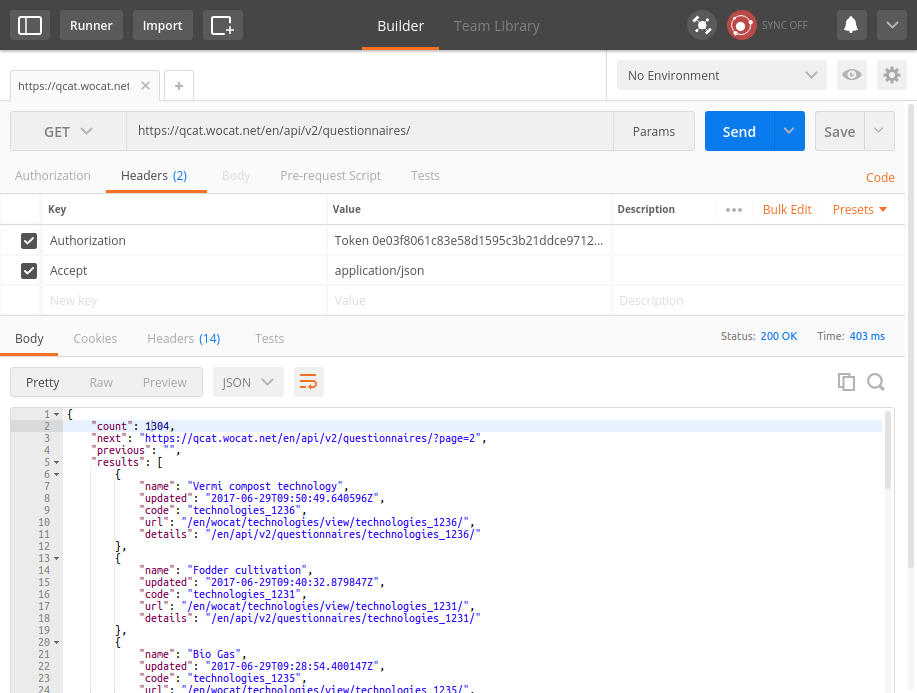
Code examples
Example code to collect all Questionnaires (in Python, using the Requests library)
Details of a Questionnaire
Return a single Questionnaire by its code. The returned data contains the full configuration (including labels of sections, questiongroups etc.).
Endpoint: /api/v2/questionnaires/{identifier}/
Allowed method: GET
- Request headers:
Authorization: Your authorization token for the QCAT API. Specified in the formatToken AUTH_TOKENAccept: Optionally specify the format of the response. Available formats are JSON (application/json), XML (application/xml) and CSV (text/csv). Default:application/json
Example request with curl
Request:
curl -X GET -H 'Authorization: Token 0e03f8061c83e58d1595c3b21ddce9712233cb4e' -H 'Accept: application/json' https://qcat.wocat.net/en/api/v2/questionnaires/approaches_2350/
Response:
{
  "section_general_information": {
    "label": "General Information",
    "children": {
      "app__1": {
        "label": "General information",
        "children": {
          "app__0__1": {
            "label": "Image",
            "children": {
              "qg_image": {
                "label": "",
                "children": {
                  "image": {
                    "label": "Image",
                    "value": [
                      {
                        "in_list": true,
                        "additional_translations": {},
                        "content_type": "image/jpeg",
                        "preview_image": "/upload/7f/0/7f06837f-0d6e-428a-999f-98d3a2f7a115.jpg",
                        "key": "Image",
                        "value": "/upload/ef/e/efe3d278-6620-49ed-b491-0ce29db214bd.jpg",
                        "template": "raw"
                      }
                    ]
                  },
                  "image_caption": {
                    "label": "Caption, explanation of photo",
                    "value": [
                      {
                        "additional_translations": {},
                        "key": "Caption, explanation of photo",
                        "value": "On-farm demonstration and exchange visits: women demonstrating the system to visitors",
                        "template": "raw"
                      }
                    ]
                  }
                }
              }
            }
          },
          // ...
        }
      }
    }
  },
  // ...
}
Hint
If the response of your request is in binary format (e.g. weird characters shown on the screen), add the parameter -\-compressed to the curl command.
Example request with Postman
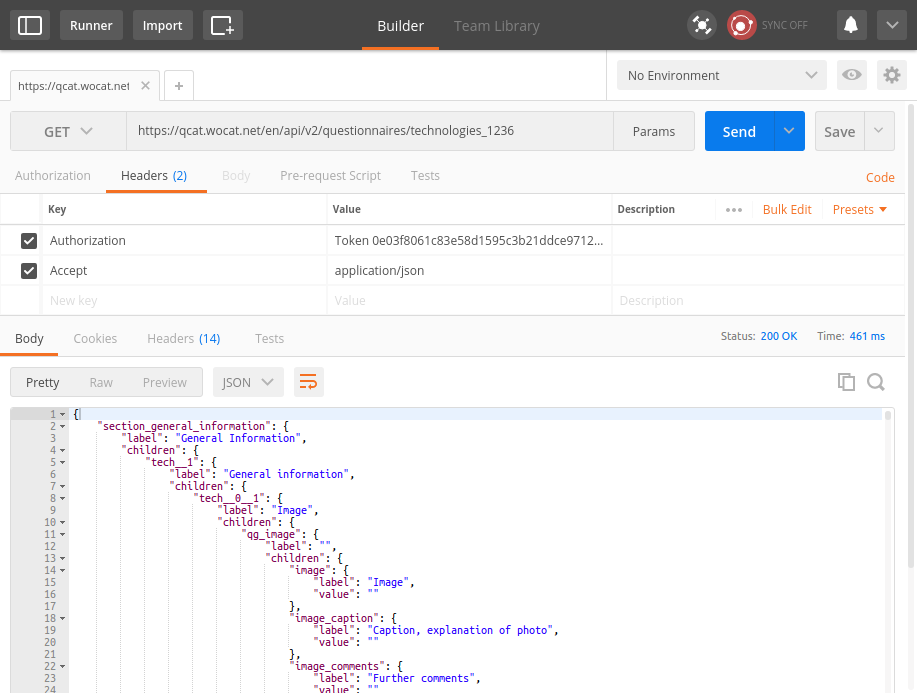
Obtain Application Token
Return the user’s application token. This application token is used for authorizing the following endpoints:
GET
Fetch Questionnaire Data and List of User’s Questionnaires.
POST
Create a New Questionnaire, Upload an Image and, Edit Existing Questionnaire.
Endpoint: /api/v2/auth/login/
Allowed method: POST
- Request headers:
Content-Type: Specify the format of the POST data. Available formats are JSON (application/json) and XML (application/xml). Default:application/json- Data:
email: The QCAT login email of the user.password: The QCAT login password of the user.
Example request with curl
Request:
curl -X POST -H 'Content-Type: application/json' -d '{"email":"abc@example.com","password":"abc123!"}' https://qcat.wocat.net/en/api/v2/auth/login/
Response:
{
    "token":"9c99bb2d2733f7bea2d20b04ac54b5e0f9fc1931"
}
Hint
If the response of your request is in binary format (e.g. weird characters shown on the screen), add the parameter -\-compressed to the curl command.
Create a New Questionnaire
Return the identifier of the successfully created Questionnaire.
Endpoint: /api/v2/questionnaires/{configuration}/{edition}/create/
Allowed method: POST
- Request headers:
Authorization: Your application token for the QCAT API. Specified in the formatToken APP_TOKENAccept: Optionally specify the format of the response. Available formats are JSON (application/json), XML (application/xml) and CSV (text/csv). Default:application/jsonContent-Type: Specify the format of the POST data. Available formats are JSON (application/json) and XML (application/xml). Default:application/json- Data:
data: The questionnaire data.
Example request with curl
Request:
curl -X POST -H 'Authorization: Token 9c99bb2d2733f7bea2d20b04ac54b5e0f9fc1931' -H 'Accept: application/json' -H 'Content-Type: application/json' -d '{"qg_name": [{"name": {"en": "Example_CreateTechnology"}}]}' https://qcat.wocat.net/en/api/v2/questionnaires/technologies/2018/create/
Response:
{
    "success":"true",
    "code": "technologies_4534"
}
Hint
If the response of your request is in binary format (e.g. weird characters shown on the screen), add the parameter -\-compressed to the curl command.
Upload an Image
Return the url and thumbnail information for the uploaded image.
Endpoint: /api/v2/image/upload/
Allowed method: POST
- Request headers:
Authorization: Your application token for the QCAT API. Specified in the formatToken APP_TOKENAccept: Optionally specify the format of the response. Available formats are JSON (application/json), XML (application/xml) and CSV (text/csv). Default:application/jsonContent-Type: The format of the POST data must be (multipart/form-data)- Data:
file: The image file to be uploaded.
Example request with curl
Request:
curl -X POST -H 'Authorization: Token 9c99bb2d2733f7bea2d20b04ac54b5e0f9fc1931' -H 'Accept: application/json' -H 'Content-Type: multipart/form-data' https://qcat.wocat.net/en/api/v2/image/upload/ -F file=@/home/Downloads/example.jpg
Response:
{
"success": true,
"uid": "cfb23a06-385a-47c5-8a94-83cae1fd90b7",
"interchange": [
    "[/upload/9d/a/9da8b521-7130-48df-ba31-549016a748e5.jpg, (default)]",
    "[/upload/0a/3/0a3fea13-1485-4ec8-92ee-351eef561d2d.jpg, (small)]",
    "[/upload/17/0/170251f9-a9ea-4945-a714-0beaebb7c750.jpg, (medium)]",
    "[/upload/cf/b/cfb23a06-385a-47c5-8a94-83cae1fd90b7.jpg, (large)]"
],
"url": "/upload/cf/b/cfb23a06-385a-47c5-8a94-83cae1fd90b7.jpg"
}
Hint
If the response of your request is in binary format (e.g. weird characters shown on the screen), add the parameter -\-compressed to the curl command.
Fetch Questionnaire Data
Returns a questionnaire’s data.
Endpoint: /api/v2/questionnaires/{configuration}/{edition}/{identifier}/
Allowed method: GET
- Request headers:
Authorization: Your application token for the QCAT API. Specified in the formatToken APP_TOKENAccept: Optionally specify the format of the response. Available formats are JSON (application/json), XML (application/xml) and CSV (text/csv). Default:application/json
Example request with curl
Request:
curl -X POST -H 'Authorization: Token 9c99bb2d2733f7bea2d20b04ac54b5e0f9fc1931' -H 'Accept: application/json' https://qcat.wocat.net/en/api/v2/questionnaires/technologies/2018/technologies_4534/
Response:
{
    "status":"draft",
    "data": {
        "qg_name": [
            {
                "name": {
                    "en": "Example_EditTechnology"
                }
            }
        ]
        // ...
    }
}
Hint
If the response of your request is in binary format (e.g. weird characters shown on the screen), add the parameter -\-compressed to the curl command.
Edit Existing Questionnaire
Return the identifier of the successfully edited Questionnaire.
Endpoint: /api/v2/questionnaires/{configuration}/{edition}/{identifier}/
Allowed method: POST
- Request headers:
Authorization: Your application token for the QCAT API. Specified in the formatToken APP_TOKENAccept: Optionally specify the format of the response. Available formats are JSON (application/json), XML (application/xml) and CSV (text/csv). Default:application/jsonContent-Type: Specify the format of the POST data. Available formats are JSON (application/json) and XML (application/xml). Default:application/json- Data:
data: The questionnaire data.
Example request with curl
Request:
curl -X POST -H 'Authorization: Token 9c99bb2d2733f7bea2d20b04ac54b5e0f9fc1931' -H 'Accept: application/json' -H 'Content-Type: application/json' -d '{"qg_name": [{"name": {"en": "Example_EditedTechnology"}}]}' https://qcat.wocat.net/en/api/v2/questionnaires/technologies/2018/technologies_4534/
Response:
{
    "success":"true",
    "code": "technologies_4534"
}
Hint
If the response of your request is in binary format (e.g. weird characters shown on the screen), add the parameter -\-compressed to the curl command.
List of User’s Questionnaires
Return a list of public/draft Questionnaires where the User is the compiler
Endpoint: /api/v2/questionnaires/mydata/
Allowed method: GET
- Request headers:
Authorization: Your application token for the QCAT API. Specified in the formatToken APP_TOKENAccept: Optionally specify the format of the response. Available formats are JSON (application/json), XML (application/xml) and CSV (text/csv). Default:application/json
Example request with curl
Request:
curl -X POST -H 'Authorization: Token 9c99bb2d2733f7bea2d20b04ac54b5e0f9fc1931' -H 'Accept: application/json' -H 'Content-Type: application/json' https://qcat.wocat.net/en/api/v2/questionnaires/mydata/
Response:
{
    "results": [
    {
      "name": "Participatory action research on drip irrigation",
      "image": "/upload/22/a/22ad49a2-8e96-45d2-b8a4-bc6ca99f63a3.jpg",
      "definition": {
            "en": "Conducting participatory action research with farmers and line agencies for demonstrating, disseminating and scaling up drip irrigation."
      },
      "created": "2020-05-05T18:32:51.706944Z",
      "updated": "2020-07-15T08:16:47.710998Z",
      "code": "approaches_2350",
      "edition": "2015",
      "status": "Draft"
    },
    {
      "name": "Farmer field schools on integrated plant nutrient systems",
       "image": "/upload/a5/1/a516e41f-f788-4bfd-aacf-fd25899614e5.jpg",
      "definition": {
            "en": "Participatory and collaborative learning through the farmer field school approach"
      },
      "created": "2020-05-05T18:32:51.706944Z",
      "updated": "2020-07-15T08:16:47.710998Z",
      "code": "approaches_2351",
      "edition": "2015",
      "status": "Draft"
    },
    // ...
}
Hint
If the response of your request is in binary format (e.g. weird characters shown on the screen), add the parameter -\-compressed to the curl command.